

User Guide
guide
About Member Registration
Register as a KINDCARE Online Shop member or subscribe to our newsletter to enjoy various benefits.
[Benefits]
1. 10% Off Your First Purchase (one time only): Log in before purchasing, and the discount will be automatically applied.
2. Free Shipping (anytime, any number of times - excluding some promotions): Log in before purchasing, and shipping will be automatically free. If it is not applied, please enter the coupon code freeship on the checkout page.
3. New Product Information, Promotions, and Sale Announcements
*The above benefits are exclusive to the KINDCARE Online Shop. Please note that they cannot be used in physical stores.
About Point Granting
- KINDCARE Online Shop members will receive points usable at the KINDCARE Online Shop, based on the purchase amount of products. Member registration is free.
- 3% of the total product price (excluding tax) will be awarded as points.
[Example] When purchasing items totaling ¥16,500 (tax included) and ¥11,000 (tax included): Total amount ¥25,000 (tax excluded) x 3% = 750pt - Earned points can be checked on the [Loyalty Points] page in My Account.
- Points will be awarded 10 days after the product shipping date (*Points are not awarded at the time of order confirmation).
- When making a purchase using points, points will be awarded on the purchase amount (excluding tax) after deducting the amount used from points.
- If an order is canceled (returned), the awarded points will be forfeited.
- Points cannot be used in conjunction with discounts or campaigns.
About Using Points
- Points can be used for purchases from 100 points, with 1 point equaling 1 yen.
- After logging in, enter the number of points to use in "Use points" during checkout and click the apply button. The point amount will be deducted from the product subtotal.
- Points are exclusive to theKINDCARE Online Shop. Please note that they cannot be used in physical stores.
- Points cannot be used in conjunction with discounts or campaigns.
Caution
- Points will not be awarded if you make a purchase without logging in.
- Consumption tax, shipping fees, and handling fees are not eligible for point awards.
- Points are valid for one year from the product shipping date. [Example] If the product shipping date is January 1, 2024, the point award date is January 10, and the expiration date is January 1, 2025.
Payment can be made by credit card, Shop Pay, PayPay, Rakuten Pay, Google Pay, Apple Pay, or cash on delivery.

Free shipping on orders over 11,000 yen (tax included)
(Tax included / Unit: Yen)
cancel
Cancellation before shipping
- From the chat support, select "Order/Cancellation" > "Cancel Order", then enter the required information and contact us.
- After confirmation, a representative will contact you.
In case of cancellation after shipment
- We accept returns. Please contact us via chat support by selecting "Returns and Exchanges."
Return acceptance period
Within 14 days of receiving the product (e.g., if delivery is on April 1st, by April 14th)
*Even if you do not plan to use the product immediately, please be sure to check that there are no problems with the product when it arrives.
Items not eligible for return
- If the product has been used or washed
- If the product tag or accessories are lost or damaged by the customer
- If the item becomes scratched, damaged, soiled, wrinkled, etc. while in your possession (including odors, etc.)
*If, after receiving the returned product, we determine that it falls under any of the above categories upon inspection, we will refuse the return. - Products purchased outside the KINDCARE Online Shop *Please contact the store where you purchased the product.
How to apply for a return or refund
- Please select " Returns and Exchanges " from the chat support and fill in the necessary information to contact us.
- Our staff will then contact you with instructions on how to return the item.
*We will also take the same action if the product is defective or faulty.
*If the return is due to customer reasons, the customer will be responsible for shipping costs.
*If you return a product purchased with cash on delivery, we will refund you by bank transfer.
In this case, the transfer fee will be borne by the customer.
Exchange acceptance period
- Within 7 days of the delivery date (e.g., if delivery is on April 1st, by April 7th)
*Even if you do not plan to use the product immediately, please be sure to check that there are no problems with the product when it arrives.
Exchangeable products
- If the product has an initial defect or malfunction
- If you receive a product that is different from the one you ordered *If the product is out of stock at the KINDCARE Online Shop, you will be refunded.
*In the case of an exchange, we will provide the same product number, size, and color as the product you ordered.
Not eligible for exchange
- Due to customer reasons (size doesn't fit, product is different from what you expected, wrong product ordered, etc.)
*Please return the product and place a new order for the item you want. - If the item becomes scratched, damaged, soiled, wrinkled, etc. while in your possession (including odors, etc.)
- Products purchased outside the KINDCARE Online Shop *Please contact the store where you purchased the product.
How to apply for an exchange
- Please select " Returns and Exchanges " from the chat support and fill in the necessary information to contact us.
- A representative will contact you to explain how to exchange the item.
*We will cover the shipping costs for exchanges.
1. Select a product and add it to your cart
- Select the size, color, and quantity, then click [Add to Cart].


2. Proceed to cart
Please check your order details (product, color, size, and quantity) in your cart.

・Please select the desired delivery date and time if you have one.

・When you log in, your points will be displayed.
・If you want to use points, enter the number of points and click [Use points].
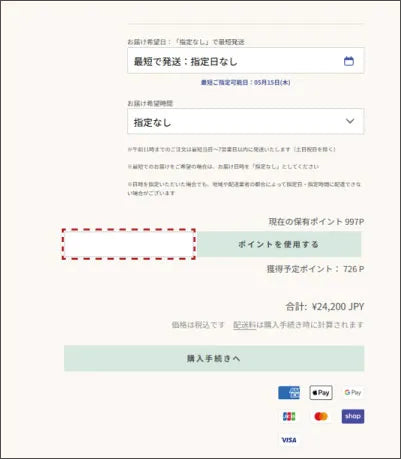
・If you are not logged in, the [Log in here] button will be displayed. If you are a member, please log in.
・If you are a new user and would like to register, please click "Register" under "Don't have an account? Register" and proceed to the registration screen.
・You can proceed with the purchase process without logging in (without registering as a member).

・Click [Log in here] to go to the login screen.
New users can also register

3. Purchase procedure
Please enter your contact information, shipping address and payment method.
<First-time users>
Enter your email address in the contact field.
<For those who are already logged in>
The email address you used to register will be displayed.

Please enter your shipping address.

Please select your payment method.
<Credit card payment>
・Please enter your card information.
・If the shipping address and billing address are the same, please check the box for [Use shipping address as billing address].
<PayPay payment/Rakuten Pay payment>
Please see here .
・Please check this box if your shipping address and billing address are the same.
Click [Order Complete] to confirm your order.

If the shipping address and billing address are different, please enter the billing address.
Click [Order Complete] to confirm your order.

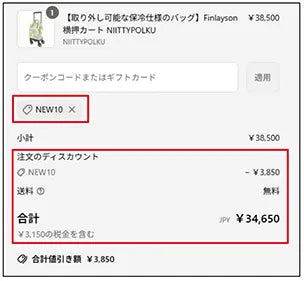
4. How to use the coupon code : Add the product you wish to purchase to your cart and proceed to checkout.
・Enter the coupon code in the coupon code input field and press the "Apply" button.
<For smartphones>
- Tap "Order Summary" at the top of the payment screen to display the field where you can enter your coupon code.
・Tap "Order Summary".
A coupon code entry field will appear.

Enter the coupon code and click the "Apply" button.

The coupon will be applied and the discounted price will be displayed.

<For PC>
・A field for entering the coupon code will appear on the right side of the payment screen.
・Enter the coupon code and click the "Apply" button.

The coupon will be applied and the discounted price will be displayed.